
Rocket Pro Loan Monitoring System
As the only Detroit Labs designer on this 7-week initiative, I designed the mobile experience for Rocket Pro’s Loan Monitoring System (LMS), a new way for real estate agents (REAs) to track their clients’ mortgages from pre-approval to closing. Working with Rocket Pro and Slalom, I took the LMS from kickoff to research-validated hi-fidelity designs for native iOS and Android. Unmoderated testing with 10 REAs showed overwhelmingly positive impressions, and Rocket leadership agreed the LMS was needed.
MY RESPONSIBILITIES
Mobile UX design, prototyping, UX research, usability testing, project management
PROJECT TYPE
Native iOS/Android app
DURATION
7 week initiative (May - Jul 2022); total time on client from Nov 2021-Jul 2022
TEAM
Rocket Pro & Slalom design, product, and dev teams
(Sole Detroit Labs designer)

01.Background:
Giving Agents Visibility into Their Clients’ Loans
Rocket Pro Insight is Rocket Mortgage’s platform for real estate agents (REAs), on web and mobile. Agents use it to follow their shared clients’ loans in real time, including:
The loan’s current stage and terms
Documents still needed from the client
The expected closing date
Approval letter adjustments to help with offer negotiations
Rocket Pro’s business goal was to increase REA referrals, so a better loan experience for agents meant more business for Rocket.
02. Problem:
Agents Couldn’t Tell If a Loan Was on Track
Existing Rocket Pro research showed that REAs lacked understanding, visibility, and agency in the loan process, which kept them from clearing obstacles for their clients before closing. Agents are constantly on the go and juggling a lot of communication, and they kept coming back to four questions:
-
Is the loan on track? They wanted an at-a-glance view that a client’s loan is moving.
-
Is there an issue? They wanted to hear about problems sooner, with the info needed to fix them.
-
Who do I talk to? Unlike with local lenders, they had no direct line to the right Rocket team member.
-
How can I help? They wanted the agency to help Rocket resolve issues so their clients’ loans closed.
03. Solution:
A Loan Monitoring System Built Around Milestones
How might we deliver an improved loan experience by offering the right loan information at the right time, in ways best suited for REAs and their clients?
Our hypothesis: if we improved communication through transparency and flagged potential issues early, we’d speed up time to close, raise satisfaction with communication, and reduce calls from REAs. The MVP focused on three features:
Milestones: the steps that matter to REAs, grouped into three loan stages: Pre-Approval, Under Contract, and Closing
Alerts: an alert bar on the client list and alert details within milestone cards
Contacts: the right Rocket contact on each milestone card, with one-click call or email
05. Research & Discovery:
Building on Existing Research
The Rocket Pro team had already done initial discovery research before this initiative. In week 1, I reviewed and collected that research, and we ran workshops and ideation exercises with stakeholders to brainstorm features and prioritize the MVP. We also looked closely at what Rocket Pro offered REAs at the time:

Rocket Pro today: loan status, but no view of loan progress
Shows loan status, but not loan progress
1
Static, one-size-fits-all layout that doesn’t mirror how fluid a home purchase is
2
No quick-glance view to confirm a client’s loan is moving and on track
3
Rocket contacts are separated from the issues they can help with
4
Limited alerts when something goes wrong with a client’s loan
5
A/B Concept Testing (User Testing #1)
To close these gaps, we explored two wireframe concepts and A/B tested them with REAs in our first round of user testing:
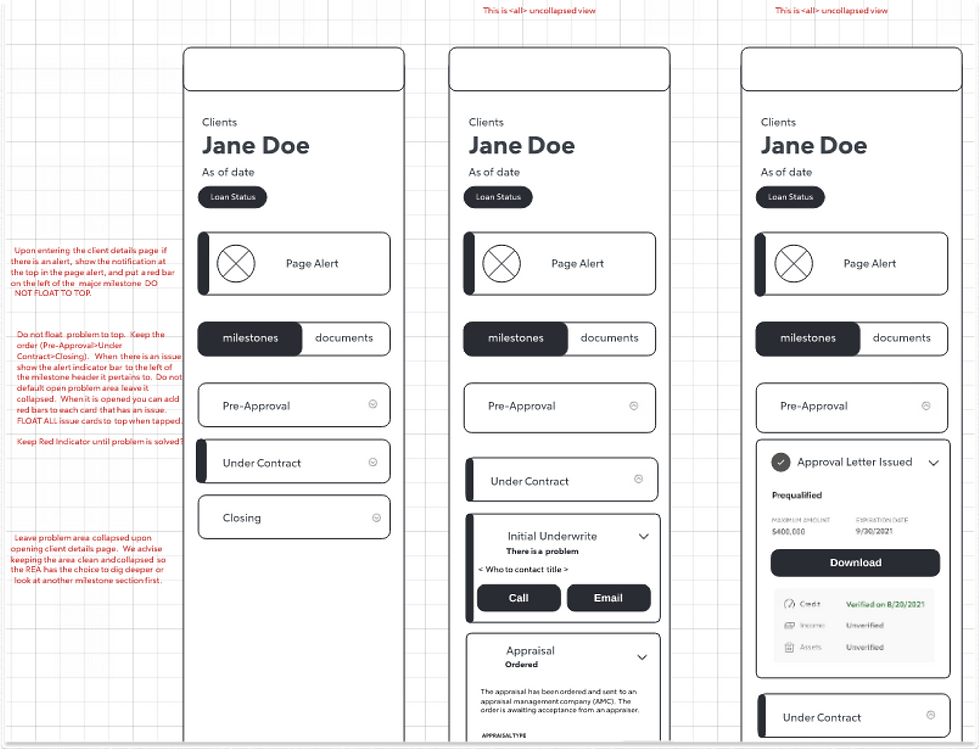
Concept 1: Static Stepper. Milestones stay in a fixed order across the three loan stages

Concept 2: Buckets & Cards. Milestone cards move between “What we’re working on,” “What’s up next,” and “Good for now”
REAs preferred Concept 2. They found it easy to navigate, felt confident it would keep them up to date, and liked that they didn’t have to guess where a problem was.
What REAs said:
-
“I found this concept unique because I didn’t have to guess which documents were needed. Everything was laid out.”
-
“I like how it boldly states what’s going on with the status.”
-
“I also like the alert was very specific on what you needed from me, what needed attention for that client.”
-
“None of the lenders I work with use this model. The link to update information was super helpful because it can move the process along quicker.”
Key design decision: we moved forward with Concept 2 but brought over Concept 1’s alert banner at the top of the page, since REAs found Concept 1 better at alerting them to a problem. The tradeoff was that cards moving between buckets are less predictable than a fixed order, so we watched for confusion in the next round of testing.
04. Product Roadmap:
7 Weeks, 2 Rounds of Testing
With no product manager from Detroit Labs on the project, I managed it myself and planned the seven weeks in three phases:
My part of the work:
Mobile UX design for native iOS and Android
Prototypes for the mobile usability testing sessions
Project planning, timelines, and stakeholder share-outs
Working across three companies, I set priorities, timelines, and clear roles up front. That structure let us run two rounds of testing with tech team reviews that helped us surface any constraints early, and still allowed us to deliver hi-fi designs in seven weeks.
Week 1
May 31 – June 3
Kickoff
-
Collect existing research
-
Workshops to brainstorm features
-
Identify and prioritize MVP features
-
Ideation exercises with stakeholders
Weeks 2–4
June 6 – June 24
Research & Design
-
Create wireframe concepts
-
Design lo-fi screens
-
Tech team review
-
A/B concept testing (user testing #1)
-
Synthesize research and update designs
Weeks 5–7
June 27 – July 15
Iterations & Share-out
-
Keep iterating based on user research
-
Design hi-fi screens
-
Continue tech team reviews
-
Unmoderated user testing (user testing #2)
-
Share-out with Rocket leadership

A/B concept testing 1 synthesis: REA feedback and quotes for each concept
06. Delivered Product:
Hi-Fidelity Solutions
The LMS replaces a static, one-size-fits-all loan view with a dynamic system of milestone cards, so REAs get status at a glance and details when they need them:
New information architecture: milestones that mirror what matters to REAs, validated by user research
Loan progress tracking: a tracker across Pre-Approval, Under Contract, and Closing, with milestone cards customized for each stage
Alerts: a banner on the client list that previews the issue and links straight to the milestone, plus a mini progress tracker on each client card
Contacts: the right Rocket contact on every milestone card, reachable by phone or email in one click
Before & After


08. Outcomes:
From Research to a Validated Solution
In seven weeks, the LMS went from kickoff to research-validated hi-fi designs and a share-out with Rocket leadership. REAs saw it as beneficial, said it created transparency into the loan process, and said it gave them more control.
Across the initiative, we ran:
10 REAs
in unmoderated testing (5 desktop, 5 mobile)
2 rounds
of user testing with REAs in 7 weeks
Rocket leadership and the tech team agreed the LMS was needed and valued that it was backed by research. We also defined the MVP and sequenced future waves, including conditions, documents, a notification center, and messaging.
The LMS didn’t ship before Detroit Labs’ engagement with Rocket ended. If it had launched, I’d have measured success with:
Speed to close: days from contract to closing on REA-referred loans
Fewer status calls: calls and emails from REAs asking for loan updates
Communication satisfaction: REA satisfaction scores on loan communication
REA referrals: weekly active REAs in the LMS and their repeat referrals
Planned Feature Sequencing
Wave 1 (MVP)
-
Milestones
-
Alerts
-
Contacts
Wave 2
-
Conditions
-
History (notes, timestamps)
-
Contacts, continued
-
Documents
-
Milestones, continued
Wave 3
-
Client list sorting
-
Notification center (expanded alerts & notifications)
Wave 4
-
Calendar
-
Messaging/chat
Later waves
-
Non-REA emails
-
Match banker
-
Client-initiated consent
-
Archive
-
State-specific closing language
09. Reflection:
My Takeaways
I worked on Rocket Pro from November 2021 to July 2022. Along with other feature work, I was the only Detroit Labs designer on the LMS, a 7-week initiative from May 31 to July 15, 2022. Here’s what I’m taking with me:
01. Bring engineering in early and often.
Tech team reviews at every stage kept our concepts buildable and surfaced constraints, like the move to a new design system, before they became blockers.
02. Research is how you earn alignment.
A/B concept testing gave us a user-centered reason to choose one direction. Leadership’s support came largely from seeing that the solution was backed by research.
03. New solutions affect what’s already in progress.
The LMS would have replaced client list and loan details updates that were already designed. I learned to map how new work affects existing roadmaps early, so stakeholders can make tradeoffs with clear information.
04. On a tight timeline, structure matters.
Seven weeks left no room for confusion. Setting priorities, timelines, and clear roles up front let us run two rounds of testing and still deliver hi-fi designs.

Milestones grouped into the three stages of the loan process

High-level user flow for the LMS
07. Usability Testing:
Validating the Design with 10 REAs
After A/B testing the wireframe concepts in our first round of user testing, we ran a second round of unmoderated testing on the hi-fi designs to see how REAs handled changing loan status scenarios.
Unmoderated User Testing (User Testing Session #2)
QUESTION 1
How do users feel about the new LMS?
Overwhelmingly positive
Most saw this new tool as beneficial
Creates transparency into the process
Gives control to the REA
QUESTION 2
Is anything confusing to users?
The system made sense for most users
Some small interactions were initially missed
Learning curve to understand status indicators and milestone details
Some clickable links weren’t recognized as links.
→ Restyle links so they clearly read as clickable.
Some small interactions were initially missed, and REAs wanted as much info as possible about each milestone.
→ Open active milestone cards in the expanded state by default.
There was a learning curve to understand the status pill, progress tracker bubbles, and milestone card status details.
→ Clarify the role of each status indicator.
The “Closing” stage label didn’t reflect a loan that had already closed.
→ Change “Closing” to “Closed” once the loan officially closes.
What we heard
What we’d change
Purpose: Evaluate how REAs reacted to the LMS as they completed tasks with changing loan status scenarios
Audience: 10 REA participants (5 desktop, 5 mobile)
My role: I built the mobile prototypes REAs used in the 5 mobile sessions
What we kept
-
The refer-a-client CTA on the closed status screen, once the loan has closed
-
The friendly tone throughout the LMS, which many REAs called “cute”
-
Detailed info about each milestone and its required actions
What We Heard, What We’d Change
10. Other Rocket Pro Work:
Features I Designed and Shipped
Along with the LMS, I designed these features for the Rocket Pro mobile app, all of which shipped:
-
Delete Account: a way for agents to delete their Rocket account, with a clear confirmation step
-
Redesigned Client List: client cards that show each loan’s stage, status, and primary Rocket contact
-
Offer Trigger: a flow for agents to notify their client’s banker when they’re ready to make an offer
-
Preferred Banker: search for and choose a preferred banker to work with
-
Add Co-Client: refer a new client and add a co-client in the same flow
-
Document Upload: upload documents for a client’s loan and see what’s already been submitted


REAs preferred Concept 2. They found it easy to navigate, felt confident it would keep them up to date, and liked that they didn’t have to guess where a problem was.
What REAs said:
-
“I found this concept unique because I didn’t have to guess which documents were needed. Everything was laid out.”
-
“I like how it boldly states what’s going on with the status.”
-
“I also like the alert was very specific on what you needed from me, what needed attention for that client.”
-
“None of the lenders I work with use this model. The link to update information was super helpful because it can move the process along quicker.”
Key design decision: we moved forward with Concept 2 but brought over Concept 1’s alert banner at the top of the page, since REAs found Concept 1 better at alerting them to a problem. The tradeoff was that cards moving between buckets are less predictable than a fixed order, so we watched for confusion in the next round of testing.