
DTE Energy Redesign/Rewrite
Rewriting and redesigning DTE Energy’s nearly decade-old mobile app from the ground up to simplify bill payments, outage reporting, and account management for 3.6 million Michigan customers on iOS and Android. The new app launched in November 2023 with 90% iOS and 86% Android adoption, 99%+ crash-free users, and a 4.4-star average rating.
MY RESPONSIBILITIES
Research, IA, user flows, wireframing, iOS/Android UI, design systems, usability testing
PROJECT TYPE
Native iOS/Android app rewrite & redesign
DURATION
Nov 2022 - Nov 2023; ongoing maintenance until May 2026
TEAM
Rotating Designers, Developers, Delivery Leads
(Sole designer, 2024-2026)

01.Background:
A Decade-Old App Holding Customers Back
DTE Energy provides electricity to 2.3 million and natural gas to 1.3 million customers across Michigan. Its mobile app, then nearly a decade old, is how many of those customers handle everyday tasks, such as:
-
Paying bills and managing payment methods
-
Reporting outages and checking outage status
-
Tracking service repairs in real time
-
Managing their account(s) and notifications
02. Problem:
An Outdated App That Frustrated Customers
Because the app was nearly ten years old, new features and experience improvements ran into constraints that could only be solved with costly workarounds, or didn’t happen at all. Customers felt it: of 274 Google Play reviews from 2021–2022, half were negative.
Detroit Labs, DTE’s partner for over 10 years, was asked to rewrite the app natively for iOS and Android and redesign it along the way. How might we make paying bills, reporting outages, and managing accounts simpler for 3.6 million customers?
03. Solution:
Centralizing and Simplifying the Experience
Our goal was to start fresh with a modern foundation that centralizes information and actions into a simpler experience, focusing on:
-
Streamlined bill payments with clearer hierarchy, calls to action, and data visualization
-
More accessible outage reporting with a simpler, more readable interface
-
Status at a glance with improved real-time repair tracking and notifications
-
Easier account management for customers with one or more accounts
04. Research & Discovery:
Understanding the Problem
We started by learning where the existing app fell short: analyzing 274 Google Play reviews in Dovetail, reconstructing the existing user flows for key tasks like paying bills and reporting outages, and running an open card sort with 7 current DTE customers.
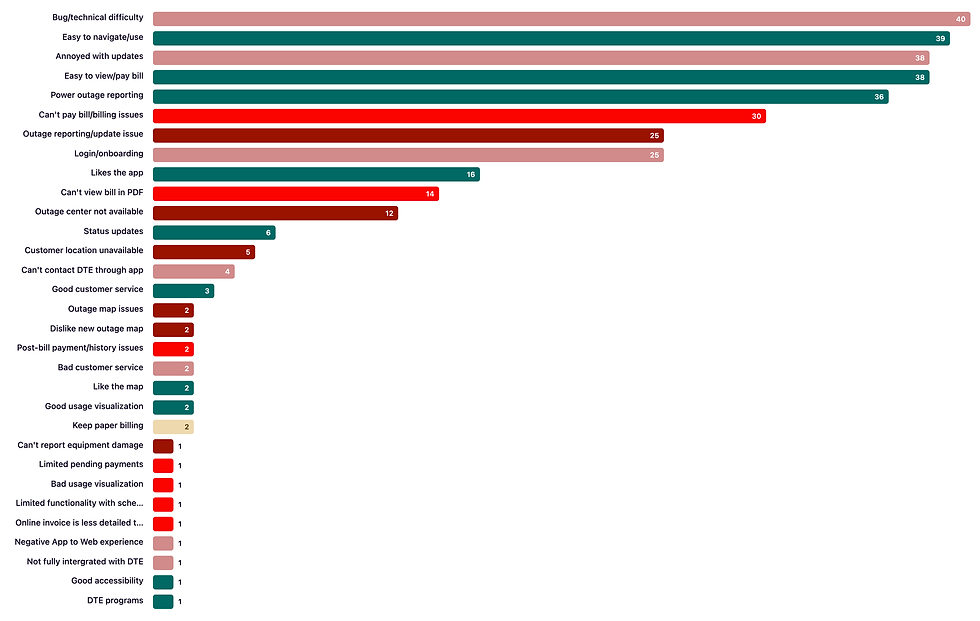
App review analysis: 274 Google Play reviews tagged by theme
What the Research Told Us
Of the 274 reviews, 41% were positive, 9% neutral, and 50% negative. Negative reviews pointed to inaccurate outage and repair status, an outage center that was unavailable when customers needed it, frequent failures when paying bills, and an app that was hard to navigate.
Mapping the existing flows for paying bills, reporting outages, and tracking repairs showed us where that friction happened and which areas to redesign first.

One participant’s open card sort (1 of 7)

New information architecture
Since nearly a decade had passed since the original app was designed, we ran an open card sort with 7 current DTE customers to see how they naturally grouped and labeled the app’s features. The results surfaced inconsistencies in the existing navigation and shaped a new, client-approved information architecture.
Key theme: Customers need their most important information, like their bill and outage status, to be easy to grasp at a glance.
05. Design Process:
Four Phases, Weekly Check-Ins
The redesign was broken into four phases, with task flows, user flows, and wireframes shared with DTE every week on Miro for feedback:
-
Initial look & feel: designing a few key screens first to get visual direction approved
-
Task flows, user flows & wireframes: outlining each goal step by step, then mapping paths and decision points
-
Hi-fidelity designs for iOS and Android
-
Edge cases & notifications: modal alerts, inline validation, banners, and system and flow errors
Hi-fidelity designs were delivered in four feature groups:
Registration
Payments
Outage
Emergency & Account
Alongside the redesign, we updated DTE’s design system, including type scales, colors, spacing, and components. I worked across all of it, with a heavier hand in defining the spacing system and building the form components for iOS and Android.

Payment Amount screen example: wireframe to iOS and Android
06. Delivered Product:
Hi-Fidelity Solutions
The rewritten app gives customers a simpler, more modern experience on iOS and Android: a clearer home screen with helpful usage insights, a step-by-step payment flow with default and split payment methods, prominent service area status when reporting outages, outage status at a glance, and one reorganized account tab.
Final Screens - Before & After


See It in Action
Registration

Tap Create an Account from the welcome screen.
Verify current service with an account number or service address.
Enter login details, with password requirements checked as you type.
Verify identity to finish creating the account.
Report Outage

Open Report Outage from the Outage Center.
Choose the location and select the problem.
Add optional details, contact information and how to get outage updates.
Submit and review important repair information.
Single Pay

Enter the payment amount.
Choose a saved payment method.
Pick a payment date. An alert warns if the date is past the shut-off date.
Review and submit to see the confirmation.
Emergency & Account Tabs

The Emergency tab puts Call 911 and the Gas Leak Hotline up front.
Expandable safety information covers gas leaks and power line problems.
The Account tab groups links under Manage, Other, Contact Us and Legal.
Edge Cases & Notifications

07. Outcomes:
A Faster, More Stable App
After a yearlong rewrite and redesign, the new DTE app launched on November 10, 2023.
After launch, the new app reached:
90%
adoption among iOS users (86% on Android)
99.23%
crash-free Android users, up from 95.38% (99.95% on iOS, up from 99.87%)
The rewrite also made both apps easier to maintain, cutting iOS code from 55,252 to 31,090 lines and Android code from 66,001 to 59,119 lines.
The redesign was also well received:
-
The app has maintained an average 4.4-star rating on the App Store and Google Play
-
Early store reviews showed customers were satisfied with the updated UI and designs
-
The work further strengthened Detroit Labs’ 10-year partnership with DTE
08. Reflection:
My Takeaways
I worked on the DTE app from November 2022 through May 2026. This case study covers the initial rewrite and redesign, from research through the MVP launch in November 2023. After launch, I kept designing new features, including type-ahead location search, status-first outage notifications, photo upload, and deregistration, and ran moderated usability testing with 6 participants in Q4 2024 to refine them. Here’s what I’m taking with me:
01. Review data makes the case for you.
Tagging 274 app reviews by theme gave us real customer quotes for every pain point we presented, which made it easier to align DTE on what to redesign and why.
02. Structure keeps approvals moving.
Multiple rounds of client feedback kept pushing our timeline. A features roadmap with clear approval deadlines, plus design decisions logged in Azure DevOps, got us back on track and showed me how much clear documentation matters on large-scale redesigns.
03. Launch is just the starting line.
Staying on the app after launch let me test new features with real customers and fold their feedback into the next iteration. Continuous feedback is what keeps an app responsive to what customers need.

Guest Pay task flow and user flow (happy path) example

Updated design system: type styles, color styles, spacing, and form components

Features roadmap in Miro: sprint-by-sprint design deadlines and client approvals
Managing client communications was one of our biggest pain points. To keep approvals on track, we built a features roadmap in Miro with clear approval deadlines and documented every design decision in Azure DevOps.